You are not logged in.
- Topics: Active | Unanswered
#1 2026-04-17 09:42:45
- festry
- Member
- Registered: 2023-11-26
- Posts: 10
[SOLVED] steamwebhelper not responding / launching, out of ideas
Hello! A few days ago, I momentarily downgraded my nvidia-open drivers to run some troubleshooting on an unrelated issue. I brought them back up to date soon after, but ran into a few hiccups along the way, which seem to have started this. Since then, Steam has been failing to launch with errors primarily pertaining to steamwebhelper. I've done all I could, but both my ideas and search results have run dry now, so I'm finally asking for help here.
To start, here's the stdout output of running 'steam':
It starts with a few warnings I couldn't find anything on, then, when steamwebhelper tries to start, it fails, tries again for a while, eventually opens a window identical to one shown below, and then keeps trying again until terminated.
steam.sh[25446]: Running Steam on arch rolling 64-bit
steam.sh[25446]: STEAM_RUNTIME is enabled automatically
setup.sh[25498]: Steam runtime environment up-to-date!
steam-runtime-identify-library-abi: Cannot run ldconfig: wait status 139
run.sh[25522]: steam-runtime-identify-library-abi --ldconfig-paths failed, falling back to ldconfig
run.sh[25522]: Warning: An unexpected error occurred while executing "/sbin/ldconfig -XNv", the exit status was 139
steam.sh[25446]: Log already open
steam.sh[25446]: Steam client's requirements are satisfied
CProcessEnvironmentManager is ready, 6 preallocated environment variables.
[2026-04-17 11:24:15] Startup - updater built Mar 13 2026 01:52:12
[2026-04-17 11:24:15] Startup - Steam Client launched with: '/home/festry/.local/share/Steam/ubuntu12_32/steam' '-srt-logger-opened'
04/17 11:24:15 minidumps folder is set to /tmp/dumps
04/17 11:24:15 Init: Installing breakpad exception handler for appid(steam)/version(1773426488)/tid(25571)
CProcessEnvironmentManager is ready, 6 preallocated environment variables.
[2026-04-17 11:24:15] Loading cached metrics from disk (/home/festry/.local/share/Steam/package/steam_client_metrics.bin)
[2026-04-17 11:24:15] Using the following download hosts for Public, Realm steamglobal
[2026-04-17 11:24:15] 1. https://client-update.akamai.steamstatic.com, /, Realm 'steamglobal', weight was 400, source = 'update_hosts_cached.vdf'
[2026-04-17 11:24:15] 2. https://client-update.fastly.steamstatic.com, /, Realm 'steamglobal', weight was 900, source = 'update_hosts_cached.vdf'
[2026-04-17 11:24:15] 3. https://client-update.steamstatic.com, /, Realm 'steamglobal', weight was 1, source = 'baked in'
[2026-04-17 11:24:15] Verifying installation...
[2026-04-17 11:24:15] Verifying file sizes only
[2026-04-17 11:24:15] Process started with command-line: '/home/festry/.local/share/Steam/ubuntu12_32/steam' '-child-update-ui' '-child-update-ui-socket' '13' '-srt-logger-opened'
04/17 11:24:15 minidumps folder is set to /tmp/dumps
[2026-04-17 11:24:15] Using update UI: xwin
04/17 11:24:15 Init: Installing breakpad exception handler for appid(steam)/version(0)/tid(25572)
[2026-04-17 11:24:15] Create window
[2026-04-17 11:24:15] Verification complete
UpdateUI: skip show logo

Steam logging initialized: directory: /home/festry/.local/share/Steam/logs

[2026-04-17 11:24:15] ProcessNextMessage: socket disconnected
[2026-04-17 11:24:15] No more messages are expected - exiting
XOpenIM() failed, LANG = en_US.UTF=8
XOpenIM() failed, LANG = en_US.UTF=8XRRGetOutputInfo Workaround: initialized with override: 0 real: 0xf654f370
XRRGetCrtcInfo Workaround: initialized with override: 0 real: 0xf654dcc0
04/17 11:24:15 minidumps folder is set to /tmp/dumps
04/17 11:24:15 Init: Installing breakpad exception handler for appid(steamsysinfo)/version(1773426488)/tid(25579)
Running query: 1 - GpuTopology
Response: gpu_topology {
  gpus {
    id: 1
    name: "NVIDIA GeForce RTX 4070"
    vram_size_bytes: 12878610432
    driver_id: k_EGpuDriverId_NvidiaProprietary
    driver_version_major: 595
    driver_version_minor: 58
    driver_version_patch: 3
    luid: 0
  }
  default_gpu_id: 1
}

Exit code: 0
Saving response to: /tmp/steamIoMbpp - 50 bytes
Fontconfig warning: line 5: unknown element "description"
Fontconfig warning: "/etc/fonts/conf.d/10-hinting-slight.conf", line 4: unknown element "description"
Fontconfig warning: "/etc/fonts/conf.d/10-scale-bitmap-fonts.conf", line 4: unknown element "description"
Fontconfig error: "/etc/fonts/conf.d/10-scale-bitmap-fonts.conf", line 72: non-double matrix element
Fontconfig error: "/etc/fonts/conf.d/10-scale-bitmap-fonts.conf", line 72: non-double matrix element
Fontconfig warning: "/etc/fonts/conf.d/10-scale-bitmap-fonts.conf", line 80: saw unknown, expected number
Fontconfig warning: "/etc/fonts/conf.d/10-yes-antialias.conf", line 4: unknown element "description"
Fontconfig warning: "/etc/fonts/conf.d/11-lcdfilter-default.conf", line 4: unknown element "description"
Fontconfig warning: "/etc/fonts/conf.d/20-unhint-small-vera.conf", line 4: unknown element "description"
Fontconfig warning: "/etc/fonts/conf.d/30-metric-aliases.conf", line 4: unknown element "description"
Fontconfig warning: "/etc/fonts/conf.d/40-nonlatin.conf", line 4: unknown element "description"
Fontconfig warning: "/etc/fonts/conf.d/45-generic.conf", line 4: unknown element "description"
Fontconfig warning: "/etc/fonts/conf.d/45-latin.conf", line 4: unknown element "description"
Fontconfig warning: "/etc/fonts/conf.d/48-spacing.conf", line 4: unknown element "description"
Fontconfig warning: "/etc/fonts/conf.d/49-sansserif.conf", line 4: unknown element "description"
Fontconfig warning: "/etc/fonts/conf.d/50-user.conf", line 4: unknown element "description"
Fontconfig warning: "/etc/fonts/conf.d/51-local.conf", line 4: unknown element "description"
Fontconfig warning: "/etc/fonts/conf.d/60-generic.conf", line 4: unknown element "description"
Fontconfig warning: "/etc/fonts/conf.d/60-latin.conf", line 4: unknown element "description"
Fontconfig warning: "/etc/fonts/conf.d/65-nonlatin.conf", line 4: unknown element "description"
steamwebhelper.sh[25583]: Starting steamwebhelper under bootstrap steamrt steam runtime via: /home/festry/.local/share/Steam/steamrt64/pv-runtime/steam-runtime-steamrt/_v2-entry-point
steamwebhelper.sh[25583]: Starting steamwebhelper with steamrt steam runtime at /home/festry/.local/share/Steam/steamrt64/pv-runtime/steam-runtime-steamrt/_v2-entry-point
i386-linux-gnu-capsule-capture-libs: error: code 0: gelf_getehdr(/usr/lib32/libgallium-26.0.4-arch1.1.so): invalid file descriptor
pressure-vessel-wrap[25583]: E: Child process exited with code 1
Steam Runtime Launch Service: starting steam-runtime-launcher-service
Steam Runtime Launch Service: steam-runtime-launcher-service is running pid 25711
bus_name=com.steampowered.PressureVessel.LaunchAlongsideSteam
steamwebhelper.sh[25740]: Starting steamwebhelper under bootstrap steamrt steam runtime via: /home/festry/.local/share/Steam/steamrt64/pv-runtime/steam-runtime-steamrt/_v2-entry-point
steamwebhelper.sh[25740]: Starting steamwebhelper with steamrt steam runtime at /home/festry/.local/share/Steam/steamrt64/pv-runtime/steam-runtime-steamrt/_v2-entry-point
i386-linux-gnu-capsule-capture-libs: error: code 0: gelf_getehdr(/usr/lib32/libgallium-26.0.4-arch1.1.so): invalid file descriptor
pressure-vessel-wrap[25740]: E: Child process exited with code 1
steamwebhelper.sh[25818]: Starting steamwebhelper under bootstrap steamrt steam runtime via: /home/festry/.local/share/Steam/steamrt64/pv-runtime/steam-runtime-steamrt/_v2-entry-point
steamwebhelper.sh[25818]: Starting steamwebhelper with steamrt steam runtime at /home/festry/.local/share/Steam/steamrt64/pv-runtime/steam-runtime-steamrt/_v2-entry-point
i386-linux-gnu-capsule-capture-libs: error: code 0: gelf_getehdr(/usr/lib32/libgallium-26.0.4-arch1.1.so): invalid file descriptor
pressure-vessel-wrap[25818]: E: Child process exited with code 1
steamwebhelper.sh[25899]: Starting steamwebhelper under bootstrap steamrt steam runtime via: /home/festry/.local/share/Steam/steamrt64/pv-runtime/steam-runtime-steamrt/_v2-entry-point
steamwebhelper.sh[25899]: Starting steamwebhelper with steamrt steam runtime at /home/festry/.local/share/Steam/steamrt64/pv-runtime/steam-runtime-steamrt/_v2-entry-point
i386-linux-gnu-capsule-capture-libs: error: code 0: gelf_getehdr(/usr/lib32/libgallium-26.0.4-arch1.1.so): invalid file descriptor
pressure-vessel-wrap[25899]: E: Child process exited with code 1
steamwebhelper.sh[25975]: Starting steamwebhelper under bootstrap steamrt steam runtime via: /home/festry/.local/share/Steam/steamrt64/pv-runtime/steam-runtime-steamrt/_v2-entry-point
steamwebhelper.sh[25975]: Starting steamwebhelper with steamrt steam runtime at /home/festry/.local/share/Steam/steamrt64/pv-runtime/steam-runtime-steamrt/_v2-entry-point
i386-linux-gnu-capsule-capture-libs: error: code 0: gelf_getehdr(/usr/lib32/libgallium-26.0.4-arch1.1.so): invalid file descriptor
pressure-vessel-wrap[25975]: E: Child process exited with code 1
steamwebhelper.sh[26057]: Starting steamwebhelper under bootstrap steamrt steam runtime via: /home/festry/.local/share/Steam/steamrt64/pv-runtime/steam-runtime-steamrt/_v2-entry-point
steamwebhelper.sh[26057]: Starting steamwebhelper with steamrt steam runtime at /home/festry/.local/share/Steam/steamrt64/pv-runtime/steam-runtime-steamrt/_v2-entry-point
i386-linux-gnu-capsule-capture-libs: error: code 0: gelf_getehdr(/usr/lib32/libgallium-26.0.4-arch1.1.so): invalid file descriptor
pressure-vessel-wrap[26057]: E: Child process exited with code 1
steamwebhelper.sh[26133]: Starting steamwebhelper under bootstrap steamrt steam runtime via: /home/festry/.local/share/Steam/steamrt64/pv-runtime/steam-runtime-steamrt/_v2-entry-point
steamwebhelper.sh[26133]: Starting steamwebhelper with steamrt steam runtime at /home/festry/.local/share/Steam/steamrt64/pv-runtime/steam-runtime-steamrt/_v2-entry-point
i386-linux-gnu-capsule-capture-libs: error: code 0: gelf_getehdr(/usr/lib32/libgallium-26.0.4-arch1.1.so): invalid file descriptor
pressure-vessel-wrap[26133]: E: Child process exited with code 1
steamwebhelper.sh[26209]: Starting steamwebhelper under bootstrap steamrt steam runtime via: /home/festry/.local/share/Steam/steamrt64/pv-runtime/steam-runtime-steamrt/_v2-entry-point
steamwebhelper.sh[26209]: Starting steamwebhelper with steamrt steam runtime at /home/festry/.local/share/Steam/steamrt64/pv-runtime/steam-runtime-steamrt/_v2-entry-point
i386-linux-gnu-capsule-capture-libs: error: code 0: gelf_getehdr(/usr/lib32/libgallium-26.0.4-arch1.1.so): invalid file descriptor
pressure-vessel-wrap[26209]: E: Child process exited with code 1
steamwebhelper.sh[26287]: Starting steamwebhelper under bootstrap steamrt steam runtime via: /home/festry/.local/share/Steam/steamrt64/pv-runtime/steam-runtime-steamrt/_v2-entry-point
steamwebhelper.sh[26287]: Starting steamwebhelper with steamrt steam runtime at /home/festry/.local/share/Steam/steamrt64/pv-runtime/steam-runtime-steamrt/_v2-entry-point
i386-linux-gnu-capsule-capture-libs: error: code 0: gelf_getehdr(/usr/lib32/libgallium-26.0.4-arch1.1.so): invalid file descriptor
pressure-vessel-wrap[26287]: E: Child process exited with code 1
steamwebhelper.sh[26364]: Starting steamwebhelper under bootstrap steamrt steam runtime via: /home/festry/.local/share/Steam/steamrt64/pv-runtime/steam-runtime-steamrt/_v2-entry-point
steamwebhelper.sh[26364]: Starting steamwebhelper with steamrt steam runtime at /home/festry/.local/share/Steam/steamrt64/pv-runtime/steam-runtime-steamrt/_v2-entry-point
i386-linux-gnu-capsule-capture-libs: error: code 0: gelf_getehdr(/usr/lib32/libgallium-26.0.4-arch1.1.so): invalid file descriptor
pressure-vessel-wrap[26364]: E: Child process exited with code 1
steamwebhelper.sh[26446]: Starting steamwebhelper under bootstrap steamrt steam runtime via: /home/festry/.local/share/Steam/steamrt64/pv-runtime/steam-runtime-steamrt/_v2-entry-point
steamwebhelper.sh[26446]: Starting steamwebhelper with steamrt steam runtime at /home/festry/.local/share/Steam/steamrt64/pv-runtime/steam-runtime-steamrt/_v2-entry-point
i386-linux-gnu-capsule-capture-libs: error: code 0: gelf_getehdr(/usr/lib32/libgallium-26.0.4-arch1.1.so): invalid file descriptor
pressure-vessel-wrap[26446]: E: Child process exited with code 1
steamwebhelper.sh[26522]: Starting steamwebhelper under bootstrap steamrt steam runtime via: /home/festry/.local/share/Steam/steamrt64/pv-runtime/steam-runtime-steamrt/_v2-entry-point
steamwebhelper.sh[26522]: Starting steamwebhelper with steamrt steam runtime at /home/festry/.local/share/Steam/steamrt64/pv-runtime/steam-runtime-steamrt/_v2-entry-point
i386-linux-gnu-capsule-capture-libs: error: code 0: gelf_getehdr(/usr/lib32/libgallium-26.0.4-arch1.1.so): invalid file descriptor
pressure-vessel-wrap[26522]: E: Child process exited with code 1
[2026-04-17 11:26:16] Background update loop checking for update. . .
[2026-04-17 11:26:16] Checking for available updates...
[2026-04-17 11:26:16] Downloading manifest: https://client-update.akamai.steamstatic.com/steam_client_ubuntu12
src/steamUI/steamuisharedjscontroller.cpp (529) : Failed creating offscreen shared JS context
src/steamUI/steamuisharedjscontroller.cpp (529) : Failed creating offscreen shared JS context
04/17 11:26:16 Init: Installing breakpad exception handler for appid(steam)/version(1773426488)/tid(25571)
assert_20260417112616_29.dmp[26616]: Uploading dump (out-of-process)
/tmp/dumps/assert_20260417112616_29.dmp
[2026-04-17 11:26:17] Manifest download: send request
[2026-04-17 11:26:17] Manifest download: waiting for download to finish
[2026-04-17 11:26:17] Manifest download: finished
[2026-04-17 11:26:17] Download skipped: /steam_client_ubuntu12 version 1773426488, installed version 1773426488, existing pending version 0
[2026-04-17 11:26:17] Nothing to do
steamwebhelper.sh[26620]: Starting steamwebhelper under bootstrap steamrt steam runtime via: /home/festry/.local/share/Steam/steamrt64/pv-runtime/steam-runtime-steamrt/_v2-entry-point
steamwebhelper.sh[26620]: Starting steamwebhelper with steamrt steam runtime at /home/festry/.local/share/Steam/steamrt64/pv-runtime/steam-runtime-steamrt/_v2-entry-point
i386-linux-gnu-capsule-capture-libs: error: code 0: gelf_getehdr(/usr/lib32/libgallium-26.0.4-arch1.1.so): invalid file descriptor
pressure-vessel-wrap[26620]: E: Child process exited with code 1
assert_20260417112616_29.dmp[26616]: Finished uploading minidump (out-of-process): success = yes
assert_20260417112616_29.dmp[26616]: response: CrashID=bp-65faa32e-1213-4672-8887-e03d52260417
assert_20260417112616_29.dmp[26616]: file ''/tmp/dumps/assert_20260417112616_29.dmp'', upload yes: ''CrashID=bp-65faa32e-1213-4672-8887-e03d52260417''
reaping pid: 25572 -- steam
steamwebhelper.sh[26697]: Starting steamwebhelper under bootstrap steamrt steam runtime via: /home/festry/.local/share/Steam/steamrt64/pv-runtime/steam-runtime-steamrt/_v2-entry-point
steamwebhelper.sh[26697]: Starting steamwebhelper with steamrt steam runtime at /home/festry/.local/share/Steam/steamrt64/pv-runtime/steam-runtime-steamrt/_v2-entry-point
i386-linux-gnu-capsule-capture-libs: error: code 0: gelf_getehdr(/usr/lib32/libgallium-26.0.4-arch1.1.so): invalid file descriptor
pressure-vessel-wrap[26697]: E: Child process exited with code 1
steamwebhelper.sh[26775]: Starting steamwebhelper under bootstrap steamrt steam runtime via: /home/festry/.local/share/Steam/steamrt64/pv-runtime/steam-runtime-steamrt/_v2-entry-point
steamwebhelper.sh[26775]: Starting steamwebhelper with steamrt steam runtime at /home/festry/.local/share/Steam/steamrt64/pv-runtime/steam-runtime-steamrt/_v2-entry-point
i386-linux-gnu-capsule-capture-libs: error: code 0: gelf_getehdr(/usr/lib32/libgallium-26.0.4-arch1.1.so): invalid file descriptor
pressure-vessel-wrap[26775]: E: Child process exited with code 1
steamwebhelper.sh[26852]: Starting steamwebhelper under bootstrap steamrt steam runtime via: /home/festry/.local/share/Steam/steamrt64/pv-runtime/steam-runtime-steamrt/_v2-entry-point
steamwebhelper.sh[26852]: Starting steamwebhelper with steamrt steam runtime at /home/festry/.local/share/Steam/steamrt64/pv-runtime/steam-runtime-steamrt/_v2-entry-point
i386-linux-gnu-capsule-capture-libs: error: code 0: gelf_getehdr(/usr/lib32/libgallium-26.0.4-arch1.1.so): invalid file descriptor
pressure-vessel-wrap[26852]: E: Child process exited with code 1
steamwebhelper.sh[26978]: Starting steamwebhelper under bootstrap steamrt steam runtime via: /home/festry/.local/share/Steam/steamrt64/pv-runtime/steam-runtime-steamrt/_v2-entry-point
steamwebhelper.sh[26978]: Starting steamwebhelper with steamrt steam runtime at /home/festry/.local/share/Steam/steamrt64/pv-runtime/steam-runtime-steamrt/_v2-entry-point
i386-linux-gnu-capsule-capture-libs: error: code 0: gelf_getehdr(/usr/lib32/libgallium-26.0.4-arch1.1.so): invalid file descriptor
pressure-vessel-wrap[26978]: E: Child process exited with code 1
steamwebhelper.sh[27104]: Starting steamwebhelper under bootstrap steamrt steam runtime via: /home/festry/.local/share/Steam/steamrt64/pv-runtime/steam-runtime-steamrt/_v2-entry-point
steamwebhelper.sh[27104]: Starting steamwebhelper with steamrt steam runtime at /home/festry/.local/share/Steam/steamrt64/pv-runtime/steam-runtime-steamrt/_v2-entry-point
i386-linux-gnu-capsule-capture-libs: error: code 0: gelf_getehdr(/usr/lib32/libgallium-26.0.4-arch1.1.so): invalid file descriptor
pressure-vessel-wrap[27104]: E: Child process exited with code 1
steamwebhelper.sh[35431]: Starting steamwebhelper under bootstrap steamrt steam runtime via: /home/festry/.local/share/Steam/steamrt64/pv-runtime/steam-runtime-steamrt/_v2-entry-point
steamwebhelper.sh[35431]: Starting steamwebhelper with steamrt steam runtime at /home/festry/.local/share/Steam/steamrt64/pv-runtime/steam-runtime-steamrt/_v2-entry-point
i386-linux-gnu-capsule-capture-libs: error: code 0: gelf_getehdr(/usr/lib32/libgallium-26.0.4-arch1.1.so): invalid file descriptor
pressure-vessel-wrap[35431]: E: Child process exited with code 1
[2026-04-17 11:27:26] Shutdown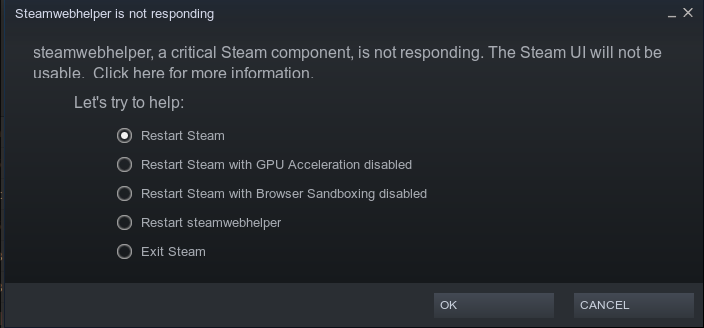
None of the options in this menu help, and I've followed all basic troubleshooting steps that I'm aware of, including a full system upgrade and reinstalling after purging all of its files.
I'm at a loss for what to do now, so if anyone can make anything out of this, even just a potential lead to follow, I would be immensely grateful. Please tell me if there are any more logs that could be of use, or any unusual troubleshooting steps to try. Thanks in advance!
Last edited by festry (2026-04-18 20:11:20)
Offline
#2 2026-04-17 13:38:07
- seth
- Member

- From: Won't reply 2 private help req
- Registered: 2012-09-03
- Posts: 77,020
Re: [SOLVED] steamwebhelper not responding / launching, out of ideas
Hybrid graphics?
Do you have the vulkan implementation for the IGP installed (incl the lib32 package)?
https://bbs.archlinux.org/viewtopic.php?id=312852
Offline
#3 2026-04-18 12:35:48
- festry
- Member
- Registered: 2023-11-26
- Posts: 10
Re: [SOLVED] steamwebhelper not responding / launching, out of ideas
Hybrid graphics?
Do you have the vulkan implementation for the IGP installed (incl the lib32 package)?
https://bbs.archlinux.org/viewtopic.php?id=312852
Yes, intel integrated + nvidia discrete. I did not have them before, but installing both vulkan-intel and lib32-vulkan-intel sadly didn't help.
Around the same time steam broke, pacman started giving me this odd segfault after any installation/removal, no actual visible effect on anything, but I figured it's worth mentioning:
...
:: Processing package changes...
(1/1) removing cowsay                                               [######################################] 100%
error: command terminated by signal 11: Segmentation fault
...
...
:: Processing package changes...
(1/1) installing cowsay                                             [######################################] 100%
error: command terminated by signal 11: Segmentation fault
...
vulkaninfo --summary might also be relevant here:
==========
VULKANINFO
==========

Vulkan Instance Version: 1.4.341


Instance Extensions: count = 27
-------------------------------
VK_EXT_acquire_drm_display             : extension revision 1
VK_EXT_acquire_xlib_display            : extension revision 1
VK_EXT_debug_report                    : extension revision 10
VK_EXT_debug_utils                     : extension revision 2
VK_EXT_direct_mode_display             : extension revision 1
VK_EXT_display_surface_counter         : extension revision 1
VK_EXT_headless_surface                : extension revision 1
VK_EXT_layer_settings                  : extension revision 2
VK_EXT_surface_maintenance1            : extension revision 1
VK_EXT_swapchain_colorspace            : extension revision 5
VK_KHR_device_group_creation           : extension revision 1
VK_KHR_display                         : extension revision 23
VK_KHR_external_fence_capabilities     : extension revision 1
VK_KHR_external_memory_capabilities    : extension revision 1
VK_KHR_external_semaphore_capabilities : extension revision 1
VK_KHR_get_display_properties2         : extension revision 1
VK_KHR_get_physical_device_properties2 : extension revision 2
VK_KHR_get_surface_capabilities2       : extension revision 1
VK_KHR_portability_enumeration         : extension revision 1
VK_KHR_surface                         : extension revision 25
VK_KHR_surface_maintenance1            : extension revision 1
VK_KHR_surface_protected_capabilities  : extension revision 1
VK_KHR_wayland_surface                 : extension revision 6
VK_KHR_xcb_surface                     : extension revision 6
VK_KHR_xlib_surface                    : extension revision 6
VK_LUNARG_direct_driver_loading        : extension revision 1
VK_NV_display_stereo                   : extension revision 1

Instance Layers: count = 8
--------------------------
VK_LAYER_MESA_anti_lag            Open-source implementation of the VK_AMD_anti_lag extension. 1.4.303  version 1
VK_LAYER_MESA_device_select       Linux device selection layer                                 1.4.303  version 1
VK_LAYER_NV_optimus               NVIDIA Optimus layer                                         1.4.329  version 1
VK_LAYER_NV_present               NVIDIA Presentation Layer                                    1.4.329  version 1
VK_LAYER_VALVE_steam_fossilize_32 Steam Pipeline Caching Layer                                 1.3.207  version 1
VK_LAYER_VALVE_steam_fossilize_64 Steam Pipeline Caching Layer                                 1.3.207  version 1
VK_LAYER_VALVE_steam_overlay_32   Steam Overlay Layer                                          1.3.207  version 1
VK_LAYER_VALVE_steam_overlay_64   Steam Overlay Layer                                          1.3.207  version 1

Devices:
========
GPU0:
	apiVersion         = 1.4.329
	driverVersion      = 595.58.3.0
	vendorID           = 0x10de
	deviceID           = 0x2786
	deviceType         = PHYSICAL_DEVICE_TYPE_DISCRETE_GPU
	deviceName         = NVIDIA GeForce RTX 4070
	driverID           = DRIVER_ID_NVIDIA_PROPRIETARY
	driverName         = NVIDIA
	driverInfo         = 595.58.03
	conformanceVersion = 1.4.3.3
	deviceUUID         = b702d163-f8e4-d657-fac1-8b469c7b7867
	driverUUID         = 4d57923b-9f0d-587f-a383-262812d65e19
GPU1:
	apiVersion         = 1.4.335
	driverVersion      = 26.0.4
	vendorID           = 0x8086
	deviceID           = 0x4680
	deviceType         = PHYSICAL_DEVICE_TYPE_INTEGRATED_GPU
	deviceName         = Intel(R) UHD Graphics 770 (ADL-S GT1)
	driverID           = DRIVER_ID_INTEL_OPEN_SOURCE_MESA
	driverName         = Intel open-source Mesa driver
	driverInfo         = Mesa 26.0.4-arch1.1
	conformanceVersion = 1.4.0.0
	deviceUUID         = 86808046-0c00-0000-0002-000000000000
	driverUUID         = 99a44e3a-7e0c-b8a6-29d4-158cb87d6a0e
Finally, I said I was just momentarily downgrading my drivers, but now I remember I also momentarily tried out nouveau, which included a little bit of messing around with mesa. I've forgotten the precise details by now, but it definitely wasn't very clean. That is to say, it would indeed make sense if the issue was related to mesa/vulkan.
Offline
#4 2026-04-18 13:06:57
- seth
- Member
- From: Won't reply 2 private help req
- Registered: 2012-09-03
- Posts: 77,020
Re: [SOLVED] steamwebhelper not responding / launching, out of ideas
GPU0 is the nvidia one, using the nvidia-open driver,
glxinfo -Band please post your Xorg log, https://wiki.archlinux.org/title/Xorg#General (steam in doubt uses xwayland) - what kind of session are you running?
Do you have a coredump for the segfault?
Try "pacman --debug" for context (if otherwise can't determine what actually crashes there)
Offline
#5 2026-04-18 14:41:10
- festry
- Member
- Registered: 2023-11-26
- Posts: 10
Re: [SOLVED] steamwebhelper not responding / launching, out of ideas
GPU0 is the nvidia one, using the nvidia-open driver,
glxinfo -Band please post your Xorg log, https://wiki.archlinux.org/title/Xorg#General (steam in doubt uses xwayland) - what kind of session are you running?
Do you have a coredump for the segfault?
Try "pacman --debug" for context (if otherwise can't determine what actually crashes there)
Looks like it's ldconfig causing issues for pacman, just like with steam. It also segfaults when ran by itself. I haven't properly debugged anything in this way before, so I'm not really sure what I'm doing, so I'm not sure how I would share a coredump file, but here's a result of running 'gdb ldconfig <core file>' and seeing the backtrace.
Core was generated by `/usr/bin/ldconfig'.
Program terminated with signal SIGSEGV, Segmentation fault.
#0  process_elf32_file (file_name=file_name@entry=0x55559427e2c0 "/usr/lib32/libgallium-26.0.4-arch1.1.so",
    lib=<optimized out>, flag=flag@entry=0x7fffdecb6330, isa_level=0x7fffdecb6334, soname=0x7fffdecb6348,
    file_contents=<optimized out>, file_length=29360128) at ../elf/readelflib.c:129
129			  if (note->n_namesz == 4
(gdb) bt
#0  process_elf32_file (file_name=file_name@entry=0x55559427e2c0 "/usr/lib32/libgallium-26.0.4-arch1.1.so",
    lib=<optimized out>, flag=flag@entry=0x7fffdecb6330, isa_level=0x7fffdecb6334, soname=0x7fffdecb6348,
    file_contents=<optimized out>, file_length=29360128) at ../elf/readelflib.c:129
#1  0x00007fe7e68a9052 in process_elf_file (
    file_name=file_name@entry=0x55559427e2c0 "/usr/lib32/libgallium-26.0.4-arch1.1.so",
    lib=lib@entry=0x5555942735fb "libgallium-26.0.4-arch1.1.so", flag=flag@entry=0x7fffdecb6330,
    isa_level=isa_level@entry=0x7fffdecb6334, soname=soname@entry=0x7fffdecb6348,
    file_contents=file_contents@entry=0x7fe7e4800000, file_length=29360128) at ../sysdeps/x86/readelflib.c:55
#2  0x00007fe7e68a94f9 in process_file (
    real_file_name=real_file_name@entry=0x55559427e4f0 "/usr/lib32/libgallium-26.0.4-arch1.1.so",
    file_name=0x55559427e2c0 "/usr/lib32/libgallium-26.0.4-arch1.1.so",
    lib=lib@entry=0x5555942735fb "libgallium-26.0.4-arch1.1.so", flag=flag@entry=0x7fffdecb6330,
    isa_level=isa_level@entry=0x7fffdecb6334, soname=soname@entry=0x7fffdecb6348, is_link=0,
    stat_buf=0x7fffdecb6350) at readlib.c:159
#3  0x00007fe7e68a5724 in search_dir (entry=entry@entry=0x5555942581a0) at ldconfig.c:836
#4  0x00007fe7e68a3768 in search_dirs () at ldconfig.c:1007
#5  main (argc=1, argv=<optimized out>) at ldconfig.c:1305
I'm running Wayland, so there are no X logs to share. How can I share relevant Wayland/Xwayland logs? I wasn't able to find where they're stored, for some reason.
Here's the output of eglinfo -B (as recommended by the wiki over glxinfo), and glxinfo -B as well just in case.
[festry@arch ~]$ eglinfo -B
GBM platform:
EGL API version: 1.5
EGL vendor string: NVIDIA
EGL version string: 1.5
EGL client APIs: OpenGL_ES OpenGL
OpenGL core profile vendor: NVIDIA Corporation
OpenGL core profile renderer: NVIDIA GeForce RTX 4070/PCIe/SSE2
OpenGL core profile version: 4.6.0 NVIDIA 595.58.03
OpenGL core profile shading language version: 4.60 NVIDIA
OpenGL compatibility profile vendor: NVIDIA Corporation
OpenGL compatibility profile renderer: NVIDIA GeForce RTX 4070/PCIe/SSE2
OpenGL compatibility profile version: 4.6.0 NVIDIA 595.58.03
OpenGL compatibility profile shading language version: 4.60 NVIDIA
OpenGL ES profile vendor: NVIDIA Corporation
OpenGL ES profile renderer: NVIDIA GeForce RTX 4070/PCIe/SSE2
OpenGL ES profile version: OpenGL ES 3.2 NVIDIA 595.58.03
OpenGL ES profile shading language version: OpenGL ES GLSL ES 3.20

Wayland platform:
EGL API version: 1.5
EGL vendor string: NVIDIA
EGL version string: 1.5
EGL client APIs: OpenGL_ES OpenGL
OpenGL core profile vendor: NVIDIA Corporation
OpenGL core profile renderer: NVIDIA GeForce RTX 4070/PCIe/SSE2
OpenGL core profile version: 4.6.0 NVIDIA 595.58.03
OpenGL core profile shading language version: 4.60 NVIDIA
OpenGL compatibility profile vendor: NVIDIA Corporation
OpenGL compatibility profile renderer: NVIDIA GeForce RTX 4070/PCIe/SSE2
OpenGL compatibility profile version: 4.6.0 NVIDIA 595.58.03
OpenGL compatibility profile shading language version: 4.60 NVIDIA
OpenGL ES profile vendor: NVIDIA Corporation
OpenGL ES profile renderer: NVIDIA GeForce RTX 4070/PCIe/SSE2
OpenGL ES profile version: OpenGL ES 3.2 NVIDIA 595.58.03
OpenGL ES profile shading language version: OpenGL ES GLSL ES 3.20

X11 platform:
EGL API version: 1.5
EGL vendor string: NVIDIA
EGL version string: 1.5
EGL client APIs: OpenGL_ES OpenGL
OpenGL core profile vendor: NVIDIA Corporation
OpenGL core profile renderer: NVIDIA GeForce RTX 4070/PCIe/SSE2
OpenGL core profile version: 4.6.0 NVIDIA 595.58.03
OpenGL core profile shading language version: 4.60 NVIDIA
OpenGL compatibility profile vendor: NVIDIA Corporation
OpenGL compatibility profile renderer: NVIDIA GeForce RTX 4070/PCIe/SSE2
OpenGL compatibility profile version: 4.6.0 NVIDIA 595.58.03
OpenGL compatibility profile shading language version: 4.60 NVIDIA
OpenGL ES profile vendor: NVIDIA Corporation
OpenGL ES profile renderer: NVIDIA GeForce RTX 4070/PCIe/SSE2
OpenGL ES profile version: OpenGL ES 3.2 NVIDIA 595.58.03
OpenGL ES profile shading language version: OpenGL ES GLSL ES 3.20

Surfaceless platform:
EGL API version: 1.5
EGL vendor string: NVIDIA
EGL version string: 1.5
EGL client APIs: OpenGL_ES OpenGL
OpenGL core profile vendor: NVIDIA Corporation
OpenGL core profile renderer: NVIDIA GeForce RTX 4070/PCIe/SSE2
OpenGL core profile version: 4.6.0 NVIDIA 595.58.03
OpenGL core profile shading language version: 4.60 NVIDIA
OpenGL compatibility profile vendor: NVIDIA Corporation
OpenGL compatibility profile renderer: NVIDIA GeForce RTX 4070/PCIe/SSE2
OpenGL compatibility profile version: 4.6.0 NVIDIA 595.58.03
OpenGL compatibility profile shading language version: 4.60 NVIDIA
OpenGL ES profile vendor: NVIDIA Corporation
OpenGL ES profile renderer: NVIDIA GeForce RTX 4070/PCIe/SSE2
OpenGL ES profile version: OpenGL ES 3.2 NVIDIA 595.58.03
OpenGL ES profile shading language version: OpenGL ES GLSL ES 3.20

Device platform:
Device #0:

Platform Device platform:
EGL API version: 1.5
EGL vendor string: NVIDIA
EGL version string: 1.5
EGL client APIs: OpenGL_ES OpenGL
OpenGL core profile vendor: NVIDIA Corporation
OpenGL core profile renderer: NVIDIA GeForce RTX 4070/PCIe/SSE2
OpenGL core profile version: 4.6.0 NVIDIA 595.58.03
OpenGL core profile shading language version: 4.60 NVIDIA
OpenGL compatibility profile vendor: NVIDIA Corporation
OpenGL compatibility profile renderer: NVIDIA GeForce RTX 4070/PCIe/SSE2
OpenGL compatibility profile version: 4.6.0 NVIDIA 595.58.03
OpenGL compatibility profile shading language version: 4.60 NVIDIA
OpenGL ES profile vendor: NVIDIA Corporation
OpenGL ES profile renderer: NVIDIA GeForce RTX 4070/PCIe/SSE2
OpenGL ES profile version: OpenGL ES 3.2 NVIDIA 595.58.03
OpenGL ES profile shading language version: OpenGL ES GLSL ES 3.20

Device #1:

Platform Device platform:
libEGL warning: pci id for fd 31: 10de:2786, driver (null)

pci id for fd 33: 10de:2786, driver (null)
pci id for fd 34: 10de:2786, driver (null)
libEGL warning: egl: failed to create dri2 screen
libEGL warning: pci id for fd 31: 10de:2786, driver (null)

pci id for fd 33: 10de:2786, driver (null)
pci id for fd 34: 10de:2786, driver (null)
libEGL warning: egl: failed to create dri2 screen
libEGL warning: pci id for fd 31: 10de:2786, driver (null)

eglinfo: eglInitialize failed

Device #2:

Platform Device platform:
EGL API version: 1.5
EGL vendor string: Mesa Project
EGL version string: 1.5
EGL client APIs: OpenGL OpenGL_ES
OpenGL core profile vendor: Intel
OpenGL core profile renderer: Mesa Intel(R) UHD Graphics 770 (ADL-S GT1)
OpenGL core profile version: 4.6 (Core Profile) Mesa 26.0.4-arch1.1
OpenGL core profile shading language version: 4.60
OpenGL compatibility profile vendor: Intel
OpenGL compatibility profile renderer: Mesa Intel(R) UHD Graphics 770 (ADL-S GT1)
OpenGL compatibility profile version: 4.6 (Compatibility Profile) Mesa 26.0.4-arch1.1
OpenGL compatibility profile shading language version: 4.60
OpenGL ES profile vendor: Intel
OpenGL ES profile renderer: Mesa Intel(R) UHD Graphics 770 (ADL-S GT1)
OpenGL ES profile version: OpenGL ES 3.2 Mesa 26.0.4-arch1.1
OpenGL ES profile shading language version: OpenGL ES GLSL ES 3.20

Device #3:

Platform Device platform:
EGL API version: 1.5
EGL vendor string: Mesa Project
EGL version string: 1.5
EGL client APIs: OpenGL OpenGL_ES
OpenGL core profile vendor: Mesa
OpenGL core profile renderer: llvmpipe (LLVM 22.1.2, 256 bits)
OpenGL core profile version: 4.5 (Core Profile) Mesa 26.0.4-arch1.1
OpenGL core profile shading language version: 4.50
OpenGL compatibility profile vendor: Mesa
OpenGL compatibility profile renderer: llvmpipe (LLVM 22.1.2, 256 bits)
OpenGL compatibility profile version: 4.5 (Compatibility Profile) Mesa 26.0.4-arch1.1
OpenGL compatibility profile shading language version: 4.50
OpenGL ES profile vendor: Mesa
OpenGL ES profile renderer: llvmpipe (LLVM 22.1.2, 256 bits)
OpenGL ES profile version: OpenGL ES 3.2 Mesa 26.0.4-arch1.1
OpenGL ES profile shading language version: OpenGL ES GLSL ES 3.20
[festry@arch ~]$ glxinfo -B
name of display: :0
display: :0 screen: 0
direct rendering: Yes
Memory info (GL_NVX_gpu_memory_info):
Dedicated video memory: 12282 MB
Total available memory: 12282 MB
Currently available dedicated video memory: 10995 MB
OpenGL vendor string: NVIDIA Corporation
OpenGL renderer string: NVIDIA GeForce RTX 4070/PCIe/SSE2
OpenGL core profile version string: 4.6.0 NVIDIA 595.58.03
OpenGL core profile shading language version string: 4.60 NVIDIA
OpenGL core profile context flags: (none)
OpenGL core profile profile mask: core profile
OpenGL version string: 4.6.0 NVIDIA 595.58.03
OpenGL shading language version string: 4.60 NVIDIA
OpenGL context flags: (none)
OpenGL profile mask: (none)
OpenGL ES profile version string: OpenGL ES 3.2 NVIDIA 595.58.03
OpenGL ES profile shading language version string: OpenGL ES GLSL ES 3.20Offline
#6 2026-04-18 14:50:37
- seth
- Member
- From: Won't reply 2 private help req
- Registered: 2012-09-03
- Posts: 77,020
Re: [SOLVED] steamwebhelper not responding / launching, out of ideas
Looks like /usr/lib32/libgallium-26.0.4-arch1.1.so is corrupted.
pacman -Qikk lib32-mesaand probably also
sudo LC_ALL=C pacman -Qkk | grep -v ', 0 altered files' | grep -v backupI'm running Wayland, so there are no X logs to share
steam in doubt uses xwayland
What kind of "wayland"? You're certainly running the session on the nvidia GPU.
Offline
#7 2026-04-18 17:30:35
- festry
- Member
- Registered: 2023-11-26
- Posts: 10
Re: [SOLVED] steamwebhelper not responding / launching, out of ideas
Looks like /usr/lib32/libgallium-26.0.4-arch1.1.so is corrupted.
pacman -Qikk lib32-mesaand probably also
sudo LC_ALL=C pacman -Qkk | grep -v ', 0 altered files' | grep -v backupI'm running Wayland, so there are no X logs to share
seth wrote:steam in doubt uses xwayland
What kind of "wayland"? You're certainly running the session on the nvidia GPU.
You're right, libgallium was corrupted. Moving away the file and reinstalling lib32-mesa fixed everything, pacman and steam work without a hitch now. Thank you!! The help was great, I feel like I actually learned something new too. Never would've delved into this by myself.
[festry@arch ~]$ pacman -Qikk lib32-mesa
Name            : lib32-mesa
...
warning: lib32-mesa: /usr/lib32/libgallium-26.0.4-arch1.1.so (Size mismatch)
warning: lib32-mesa: /usr/lib32/libgallium-26.0.4-arch1.1.so (SHA256 checksum mismatch)
lib32-mesa: 89 total files, 1 altered file
I'm running Hyprland, just switched over from i3 last week so I'm still unfamiliar with some aspects of Wayland, apologies. It seems Wayland compositors are a lot more independent from the server than X11 WMs, does that also mean there's no such thing as a "universal" Wayland log, and everything would be in the Hyprland logs?
Offline
#8 2026-04-18 18:30:30
- seth
- Member
- From: Won't reply 2 private help req
- Registered: 2012-09-03
- Posts: 77,020
Re: [SOLVED] steamwebhelper not responding / launching, out of ideas
\o/
Please always remember to mark resolved threads by editing your initial posts subject - so others will know that there's no task left, but maybe a solution to find.
Thanks.
You should still check the overall integrity to make sure that not more files are compromised (nb. that some deviations are normal and harmless, notably in /etc - but nothing use /usr/lib and probably /usr/bin should be off)
It seems Wayland compositors are a lot more independent from the server than X11 WMs, does that also mean there's no such thing as a "universal" Wayland log, and everything would be in the Hyprland logs?
Yes. Actually Hyprland (the wayland compositor) *is* the equivalent Xorg (ie. the display server implementation) next to also being the window manager (w/ the exception of https://archlinux.org/packages/extra/x86_64/river/ )
Offline