You are not logged in.
- Topics: Active | Unanswered
#26 2026-06-06 07:36:41
- Enrico1989
- Member
- Registered: 2018-07-05
- Posts: 341
Re: Audio breaks after every suspend/change of VT
I assume it had no impact on the output changes?
Nope.
Does it help to add a strategic nap into your bashrc?
 …
if [[ ! $DISPLAY && ($XDG_VTNR == 1 || $XDG_VTNR == 2) ]]; then
   sleep 3
  case $USER in
    'enrico' )
…
(I assume you meant ~/.bash_profile) Nope, I saw no difference in how the audio behaved.
Online
#27 Yesterday 07:37:57
- Enrico1989
- Member
- Registered: 2018-07-05
- Posts: 341
Re: Audio breaks after every suspend/change of VT
Any chance the existence of these 2 jacks (even with nothing plugged in them) can cause this mess?

Online
#28 Yesterday 09:52:53
- Lone_Wolf
- Administrator

- From: Netherlands, Europe
- Registered: 2005-10-04
- Posts: 15,065
Re: Audio breaks after every suspend/change of VT
Looks like those are the front headphone and microphone jacks.
What is brand & model of your motherboard ?
Disliking systemd intensely, but not satisfied with alternatives so focusing on taming systemd.
clean chroot building not flexible enough ?
Try clean chroot manager by graysky
Offline
#29 Yesterday 12:40:50
- Enrico1989
- Member
- Registered: 2018-07-05
- Posts: 341
Re: Audio breaks after every suspend/change of VT
From my order: Gigabyte X399 AORUS Gaming 7 AMD X399 Socket TR4 ATX motherboard - Motherboards (DDR4-SDRAM, DIMM, 2133,2400,2667 MHz, Quad, 128 GB, AMD). The link currently points at https://www.amazon.it/dp/B0746CT3Y5?th=1, but I'm not sure how much accurate this link is, after 8 years.
Last edited by Enrico1989 (Yesterday 12:41:18)
Online
#30 Yesterday 13:03:06
- seth
- Member

- From: Won't reply 2 private help req
- Registered: 2012-09-03
- Posts: 75,841
Re: Audio breaks after every suspend/change of VT
The output change/addition is on the nvidia HDMI card - is this actually now stable after the initial VT switch or do subsequent VT switches again change the current output device?
Does it help to set the default profile?
https://www.baeldung.com/linux/pulseaud … lt-profile
Offline
#31 Yesterday 16:35:08
- Enrico1989
- Member
- Registered: 2018-07-05
- Posts: 341
Re: Audio breaks after every suspend/change of VT
Does it help to set the default profile?
https://www.baeldung.com/linux/pulseaud … lt-profile
Somewhat. I found I can run these commands to switch between the "non-working" and "working" cards respectively:
pactl set-card-profile alsa_card.pci-0000_08_00.3 output:iec958-stereo+input:analog-stereo
pactl set-card-profile alsa_card.pci-0000_08_00.3 output:analog-stereo+input:analog-stereo
Now I would need a way to script what I do in qpwgraph/pavucontrol in the screencasts linked below.
However, as regards the rest of that blog post you linked, that's about pulseaudio, but I'm using pipewire, right? So that doesn't apply to me, right?
After all, I don't even have a /etc/pulse/default.pa file (I have /etc/pulse/client.conf file, but that seems a different sort of file).
The output change/addition is on the nvidia HDMI card - is this actually now stable after the initial VT switch or do subsequent VT switches again change the current output device?
Honestly, I don't see much stability. But I've recorded a couple of sessions here and here and here (4 minutes and a half, 4 minutes, 4 minutes respectively, but I guess you can just scroll through); in the 3rd video I manage to achieve a behavior I had observed before filming the 1st one. I'm not sure why I observe this herratic behaviors.
Last edited by Enrico1989 (Yesterday 17:21:56)
Online
#32 Yesterday 20:13:02
- seth
- Member
- From: Won't reply 2 private help req
- Registered: 2012-09-03
- Posts: 75,841
Re: Audio breaks after every suspend/change of VT
However, as regards the rest of that blog post you linked, that's about pulseaudio, but I'm using pipewire, right? So that doesn't apply to me, right?
Right.
https://wiki.archlinux.org/title/PipeWi … _selection
Honestly, I don't see much stability.
Does the active profile still change w/ the VT switch after fixing it for the first time?
I thought it might happen because the new profiles appear.
Offline
#33 Today 05:26:38
- Enrico1989
- Member
- Registered: 2018-07-05
- Posts: 341
Re: Audio breaks after every suspend/change of VT
But that's for bluetooth, no?
I've kept reading and https://wiki.archlinux.org/title/PipeWi … mmand_line gives some scripts that you maybe were alluding to when mentioning scripting?
I've saved those scripts, made them executable, and then I run
pw-savewires pw-goodin a working scenario where I have audio coming from both a video on YouTube and one in mpv.
The content of pw-good is now this:
qutebrowser:output_FL alsa_output.pci-0000_08_00.3.analog-stereo.6:playback_FL
qutebrowser:output_FR alsa_output.pci-0000_08_00.3.analog-stereo.6:playback_FR
mpv:output_FL alsa_output.pci-0000_08_00.3.analog-stereo.6:playback_FL
mpv:output_FR alsa_output.pci-0000_08_00.3.analog-stereo.6:playback_FR
After switch to another VT and back, audio doesn't work (and the video on YouTube is paused, I think this is entirely orthogonal to the issue we are investigating; mpv, instead, keeps playing) and I can run this to make it work:
pactl set-card-profile alsa_card.pci-0000_08_00.3 output:analog-stereo+input:analog-stereo
./pw-loadwires pw-good
If I do so before the connections between the browser and "the bad entry" disappears due to the video in YouTube being paused (this as well, I think it's just the browser dropping the audio wiring due to inactivity? mpv, instead, keeps that connection even when paused), then the output is this:
Connecting qutebrowser:output_FL alsa_output.pci-0000_08_00.3.analog-stereo.6:playback_FL
Connecting qutebrowser:output_FR alsa_output.pci-0000_08_00.3.analog-stereo.6:playback_FR
Connecting mpv:output_FL alsa_output.pci-0000_08_00.3.analog-stereo.6:playback_FL
Connecting mpv:output_FR alsa_output.pci-0000_08_00.3.analog-stereo.6:playback_FR
If, instead, I wait for that connection to disappear, then the output is this:
Connecting qutebrowser:output_FL alsa_output.pci-0000_08_00.3.analog-stereo.6:playback_FL
failed to link ports: No such file or directory
Connecting qutebrowser:output_FR alsa_output.pci-0000_08_00.3.analog-stereo.6:playback_FR
failed to link ports: No such file or directory
Connecting mpv:output_FL alsa_output.pci-0000_08_00.3.analog-stereo.6:playback_FL
Connecting mpv:output_FR alsa_output.pci-0000_08_00.3.analog-stereo.6:playback_FR
In either case, when I press play on YouTube, the audio does work. I'm sort of glad it does, but I wonder what's the meaning of these lines:
failed to link ports: No such file or directoryHonestly, I don't see much stability.
Does the active profile still change w/ the VT switch after fixing it for the first time?
If I understand what you mean, the answer yes, it still changes, because everytime I switch to another VT and back, the audio doesn't work and I have to re-run the two lines above to make audio work again.
I thought it might happen because the new profiles appear.
Maybe the problem is that profiles disapper when I switch to another VT?
Online
#34 Today 05:59:04
- Enrico1989
- Member
- Registered: 2018-07-05
- Posts: 341
Re: Audio breaks after every suspend/change of VT
That number 6 you see in the pw-good file is entirely accidental.
As soon as I did some scrolling at  , everything broke again, and I had to re-construct the file via pw-savewires, and now it looks like
mpv:output_FL alsa_output.pci-0000_08_00.3.analog-stereo.8:playback_FL
mpv:output_FR alsa_output.pci-0000_08_00.3.analog-stereo.8:playback_FR
qutebrowser:output_FL alsa_output.pci-0000_08_00.3.analog-stereo.8:playback_FL
qutebrowser:output_FR alsa_output.pci-0000_08_00.3.analog-stereo.8:playback_FR
where the number is 8.
What's annoying now is that "I wait for that connection to disappear", then the audio won't work!
This is a nighmare 
Online
#35 Today 06:49:56
- Enrico1989
- Member
- Registered: 2018-07-05
- Posts: 341
Re: Audio breaks after every suspend/change of VT
I've just rebooted the system.
By the way, an info I might have forgotten to say: the audio doesn't work right after rebooting. I do have to do fix it to start with.
I've just opened YouTube + mpv playing videos, run
pactl set-card-profile alsa_card.pci-0000_08_00.3 output:analog-stereo+input:analog-stereoThen connected the wires manually like this: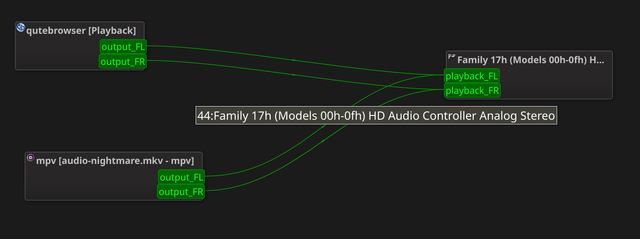
Then run this
./pw-savewires pw-good-3then switched to another VT and back.
Then
pactl set-card-profile alsa_card.pci-0000_08_00.3 output:analog-stereo+input:analog-stereo
./pw-loadwires pw-good-3
and the audio works, always in mpv, but in YouTube only if I don't let the wires disappear first. If I do so, then the audio doesn't work in YouTube, and no entry in qpwgraph shows for the browser. One workaround to this is to do this:
pactl set-card-profile alsa_card.pci-0000_08_00.3 output:iec958-stereo+input:analog-stereo
# refresh the YouTube page, now the video plays, but the audio doesn't
pactl set-card-profile alsa_card.pci-0000_08_00.3 output:analog-stereo+input:analog-stereo
./pw-loadwires pw-good-3
# now the video is paused, so click play before connections disapear
Online
#36 Today 09:10:08
- Enrico1989
- Member
- Registered: 2018-07-05
- Posts: 341
Re: Audio breaks after every suspend/change of VT
Also, I'm opening some games on Steam, and I don't hear the audio anymore
And no raindance seems to bring things back to working. Trying to do so is what I did right after #33, hence I wrote #34 & #35.
Online
#37 Today 09:44:50
- Enrico1989
- Member
- Registered: 2018-07-05
- Posts: 341
Re: Audio breaks after every suspend/change of VT
Anyway, I think the pw-savewires from the https://wiki.archlinux.org/title/PipeWi … mmand_line is not sufficient to address some simple scenario: once I've reached the condition that 2 browser tabs are playing audio, if I run that script, the produced file looks like this:
qutebrowser:output_FL alsa_output.pci-0000_08_00.3.analog-stereo:playback_FL
qutebrowser:output_FR alsa_output.pci-0000_08_00.3.analog-stereo:playback_FR
qutebrowser:output_FL alsa_output.pci-0000_08_00.3.analog-stereo:playback_FL
qutebrowser:output_FR alsa_output.pci-0000_08_00.3.analog-stereo:playback_FR
where lines 3 and 4 are really just a copy of 1 and 2. This seems wrong, just like not enough information is stored in this file and, in turn, not enough information is passed to pw-loadwires to restore things.
Online