You are not logged in.
- Topics: Active | Unanswered
#1 2026-07-27 08:19:50
- Enrico1989
- Member
- Registered: 2018-07-05
- Posts: 429
Hardware boots, but the system doesn't
The system described below I've got ArchLinux and Windows installed in dual boot, and I almost never boot the latter. I don't think this is has any importance, because the issue I'm describing occurs before anything is shown on screen or any light from the RGB keyboard turns on.
So technically, this is isn't a problem with ArchLinux, therefore let me know if I should ask elsewhere.
Relevant parts of the system:
motherboard: Gigabyte AORUS AMD X399,
video card: Nvidia GeForce GTX 1070 Ti 1683 MHz,
processor: AMD Ryzen Threadripper 1950X.
This system has exhibited some strange behavior for quite a while (years): sometimes, after a power outage or just after me normally powering it off/rebooting it, the hardware - upon pressing the power button - would show itself as alive (the lights of the motherboard, the RAM, and the case shine), but it wouldn't boot, in the sense that the screen doesn't even show the splash or anything else (meaning I can't even access the BIOS).
So far, attempting power-button reboot a few/several times was enough.
Today, it apparently isn't.
So I've decided to make a video of the debug code information shown by the mobo (I could have done this in the past, but, alas, I never thought of doing it), and below I'm listing all the codes I can read from the when I press the power button to where the "final" code is reached, 0d, which is not even shown as a possible code in the user's manual. After that, the system doesn't do any more progress.
A few notes/observations about the table:
Can you tell me how to properly typeset a table on this forum?
I'm assuming that `3F~4F` in the table in the user's manual means 3F, 40, 41, 42, …, 4d, 4e, 4f.
Whenever you see ??? in the "Meaning" column, that's a code starting with 0, which isn't listed in the user's manual, or some non-alphanumeric code (which is also not listed in the manual)
Whenever you see "No" in the "Sure?" column, that's because I think that code might actually be the result of video photogram that is in between the update from a code, to another, e.g. the 8C between FC and 3E might just be just the F transforming in a 8 while going to a 3.
In the user's manual the codes are grouped in sections, and I've included that in the last column.
Memory initialization error occurs is shown more than once, so I suppose it might be significant.
| Code             | Sure?    | Meaning                                                                  | Section      |
| ---------------- | -------- | --------                                                                 | --------     |
| 00               |          | ???                                                                      |              |
| 80               | No       | Reserved for OEM use (OEM DXE initialization codes).                     | Regular Boot |
| b4               |          | USB device hot plug-in.                                                  | Regular Boot |
| FC               |          | Reserved.                                                                | Error        |
| 8C               | No       | Reserved for OEM use (OEM DXE initialization codes).                     | Regular Boot |
| 3E               |          | PCH PEI initialization.                                                  | Regular Boot |
| 38               | No       | IOH PEI initialization.                                                  | Regular Boot |
| b7               |          | Reconfigure NVRAM settings.                                              | Regular Boot |
| 92               |          | PCI Bus initialization is started.                                       | Regular Boot |
| 02               |          | ???                                                                      |              |
| d1               |          | IOH initialization error.                                                | Error        |
| <upside-down-A>1 | No       | ???                                                                      |              |
| bE               |          | Reserved.                                                                | Regular Boot |
| 60               | No       | DXE Core is started.                                                     | Regular Boot |
| C0               |          | Reserved.                                                                | Regular Boot |
| 80               | No       | Reserved for OEM use (OEM DXE initialization codes).                     | Regular Boot |
| d3               |          | Some of the Architectural Protocols are not available.                   | Error        |
| 87               | No       | Reserved for OEM use (OEM DXE initialization codes).                     | Regular Boot |
| A7               |          | Activated all currently connected SCSI devices.                          | Regular Boot |
| b8               | No       | Reserved.                                                                | Regular Boot |
| b6               |          | Clean-up of NVRAM.                                                       | Regular Boot |
| b8               | No       | Reserved.                                                                | Regular Boot |
| 58               |          | CPU self test failed or possible CPU cache error.                        | Error        |
| Cd               |          | Reserved.                                                                | Regular Boot |
| bd               |          | Reserved.                                                                | Regular Boot |
| b1               | No       | Runtime AP installation ends.                                            | Regular Boot |
| b7               |          | Reconfigure NVRAM settings.                                              | Regular Boot |
| <upside-down-A>7 | No       | ???                                                                      |              |
| 11               |          | Pre-memory CPU initialization started.                                   | Regular Boot |
| 48               |          | Reserved.                                                                | Regular Boot |
| 2b               |          | Memory initialization.                                                   | Regular Boot |
| 88               | No       | Reserved for OEM use (OEM DXE initialization codes).                     | Regular Boot |
| 07               |          | ???                                                                      |              |
| 28               | No       | Reserved.                                                                | Regular Boot |
| 2b               |          | Memory initialization.                                                   | Regular Boot |
| 36               | No       | CPU PEI initialization.                                                  | Regular Boot |
| 3F               |          | Reserved.                                                                | Regular Boot |
| 1<mirrored 9>    | No       | ???                                                                      |              |
| 18 ??            |          | Reserved.                                                                | Regular Boot |
| 54               |          | Memory initialization error occurs.                                      | Error        |
| 94               | No       | PCI Bus enumeration for detecting how many resources are requested.      | Regular Boot |
| 33               |          | CPU PEI initialization.                                                  | Regular Boot |
| 59               | No       | CPU micro-code is not found or micro-code update is failed.              | Error        |
| 55               |          | Memory initialization error occurs.                                      | Error        |
| 95               | No       | Check PCI device requested resources.                                    | Regular Boot |
| 3b               |          | PCH PEI initialization.                                                  | Regular Boot |
| 60               |          | DXE Core is started.                                                     | Regular Boot |
| 61               |          | NVRAM initialization.                                                    | Regular Boot |
| 90               |          | Phase transfer to BDS (Boot Device Selection) from DXE.                  | Regular Boot |
| 98               |          | Console input devices connect (ex PS2/USB keyboard/mouse are activated). | Regular Boot |
| 78               |          | ACPI Core initialization.                                                | Regular Boot |
| 52               |          | Memory initialization error occurs.                                      | Error        |
| 88               |          | Reserved for OEM use (OEM DXE initialization codes).                     | Regular Boot |
| 05               |          | ???                                                                      |              |
| 09               | No       | ???                                                                      |              |
| 79               |          | CSM initialization has started.                                          | Regular Boot |
| <mirrored 6>1    | No       | ???                                                                      |              |
| 21               |          | Reserved.                                                                | Regular Boot |
| 27               |          | Reserved.                                                                | Regular Boot |
| 2d               |          | Memory initialization.                                                   | Regular Boot |
| 88               |          | Reserved for OEM use (OEM DXE initialization codes).                     | Regular Boot |
| 9E               |          | Reserved.                                                                | Regular Boot |
| 9<mirrored 9>    | No       | ???                                                                      |              |
| 92               |          | PCI Bus initialization is started.                                       | Regular Boot |
| 91               |          | Issue event to connect drivers.                                          | Regular Boot |
| 81               |          | Reserved for OEM use (OEM DXE initialization codes).                     | Regular Boot |
| b2               |          | Legacy Option ROM initialization.                                        | Regular Boot |
| 0d               |          | ???                                                                      |              |
Last edited by Enrico1989 (2026-08-23 08:17:51)
Offline
#2 2026-07-27 09:39:35
- jonno2002
- Member
- Registered: 2016-11-21
- Posts: 921
Re: Hardware boots, but the system doesn't
this is my hardware troubleshooting process:
reseat ram
reseat gfx card
reseat ssd if m.2
replug all plugs
reset cmos
normally i wouldnt say reseat the cpu as thats never the cause, but those threadrippers have a specific torque down tool right ? id give that a re-seat for sure, thats alot of pins under there!
failing all that, try a different PSU if you have one
try a different gfx card if you have one as that system appears to not have inbuilt gfx
basically trial and error
hardware issues are crazy sometimes, ive had to reset a cmos multiple times and suddenly the system comes back.
flat cmos batteries can cause weird behavior too so check that batt with a multimeter
good luck
EDIT: sorry forgot to mention try 1 stick of ram at a time and/or try a different stick to rule out bad ram
Last edited by jonno2002 (2026-07-27 09:42:50)
Offline
#3 2026-07-27 09:50:53
- Lone_Wolf
- Administrator

- From: Netherlands, Europe
- Registered: 2005-10-04
- Posts: 15,533
Re: Hardware boots, but the system doesn't
Can you tell me how to properly typeset a table on this forum?
https://www.bbcode.org/making-a-table-with-bbcode.php and https://www.bbcode.org/resources.php should help.
Disliking systemd intensely, but not satisfied with alternatives so focusing on taming systemd.
clean chroot building not flexible enough ?
Try clean chroot manager by graysky
Offline
#4 2026-07-27 10:15:12
- Enrico1989
- Member
- Registered: 2018-07-05
- Posts: 429
Re: Hardware boots, but the system doesn't
Enrico1989 wrote:Can you tell me how to properly typeset a table on this forum?
https://www.bbcode.org/making-a-table-with-bbcode.php and https://www.bbcode.org/resources.php should help.
Weird, even the example doesn't render as a table:
[table]
[tr]
[th]Name[/th]
[th]Age[/th]
[/tr]
[tr]
[td]John[/td]
[td]65[/td]
[/tr]
[tr]
[td]Gitte[/td]
[td]40[/td]
[/tr]
[tr]
[td]Sussie[/td]
[td]19[/td]
[/tr]
[/table]
Offline
#5 2026-07-27 11:50:49
- Enrico1989
- Member
- Registered: 2018-07-05
- Posts: 429
Re: Hardware boots, but the system doesn't
this is my hardware troubleshooting process:
reseat ram
reseat gfx card
reseat ssd if m.2
replug all plugs
reset cmos
I've done this in different order:
replug all plugs
reseat ram
reset cmos
reseat gfx card
and none worked. I've also tried using only one of the 2 ram sticks I have (I don't have others to try with), with no benefit.
Finally, I've tried removing the gfx card and that allowed the system to boot!
Unfortunately, without a gfx into which to plug the monitor cable, I can really use this system locally.
The way I checked that it boots, is that I can successfully SSH into it from my laptop, so I can at least use it from command line.
Now the question is: why does mobo get stuck on status "0d" and the system doesn't boot when the graphic card is installed?
Offline
#6 2026-07-27 12:25:14
- Enrico1989
- Member
- Registered: 2018-07-05
- Posts: 429
Re: Hardware boots, but the system doesn't
I've tried moving the gfx from the slot boxed in cyan to the slot boxed in yellow in the image below
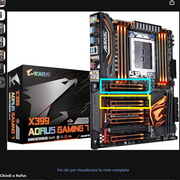
This way the system boots, I can have a monitor connected, but the system takes ages to boot: the monitor turns on (but just black) and off several times, the mobo debug code is constantly "b2". After several such cycles, I see Grub, at which point, if I choose to boot linux, I get this forever:
Loading Lijnux linux ...
Loading initial ramdisk ...
_
even though I can SSH into the system from another one and use it from cli.
Offline
#7 2026-07-27 12:26:51
- Enrico1989
- Member
- Registered: 2018-07-05
- Posts: 429
Re: Hardware boots, but the system doesn't
Ok, I've put pressed both the "Reset Button" and the "Clear CMOS Button", put the gfx card back in its original slot, and the system boots.
I'm not sure what was wrong, honestly.
For now, Solved.
Offline
#8 2026-07-27 19:31:38
- jonno2002
- Member
- Registered: 2016-11-21
- Posts: 921
Re: Hardware boots, but the system doesn't
nice, like i said hardware issues are very strange somtimes, could have been dirty pins that cleaned after many re-inserts of the card, you can try isopropyl alcohol and a toothbrush to clean slots as well
Offline
#9 2026-08-23 06:12:11
- Enrico1989
- Member
- Registered: 2018-07-05
- Posts: 429
Re: Hardware boots, but the system doesn't
The issue is definitely still happening.
Offline
#10 2026-08-23 07:00:37
- seth
- Member

- From: Won't reply 2 private help req
- Registered: 2012-09-03
- Posts: 78,659
Re: Hardware boots, but the system doesn't
https://man.archlinux.org/man/column.1 --table + [code][/code] tags.
https://bbs.archlinux.org/help.php#bbcode doesn't list table as supported and ascii in code tags it will also control the vertical size.
wouldn't boot, in the sense that the screen doesn't even show the splash
Does the BIOS make a happy sound to indicate a successful POST?
Ok, reading on…
Finally, I've tried removing the gfx card and that allowed the system to boot!
… from the slot boxed in cyan to the slot boxed in yellow … the system boots … system takes ages to boot: the monitor turns on (but just black) and off several times
The one closest to the CPU is typically the PEG slot and your GPU belongs there - did you maybe forget to attach the dedicated 6/8-pin power supply?
The issue is definitely still happening.
Do you have a spare GPU?
Since the system seems to have an IGP + VGA output (as it boots w/o GPU) does it produce a signal *there* when there's no output on the GPU?
Offline
#11 2026-08-23 08:43:38
- Enrico1989
- Member
- Registered: 2018-07-05
- Posts: 429
Re: Hardware boots, but the system doesn't
https://man.archlinux.org/man/column.1 --table + [code][/code] tags.
Not sure if you meant what I've just done in the OP.
The one closest to the CPU is typically the PEG slot and your GPU belongs there
Ok, I won't try other slots again.
did you maybe forget to attach the dedicated 6/8-pin power supply?
Nope, I didn't.
Do you have a spare GPU?
No, unfortunately  I'd have to buy one, but doing it without being sure it's GPU's fault rather than anything else, e.g. the mobo, feels like a risk, economically speaking.
Since the system seems to have an IGP + VGA output (as it boots w/o GPU) does it produce a signal *there* when there's no output on the GPU?
I'm not sure I understand:
what does IGP + VGA output imply? I don't think I can connect a monitor without the GPU installed… where would I plug the DP, or even HDMI cable?
by "signal" do you mean an audio signal?
By "*there*" do you mean "the sound comes from the GPU card as opposed to external speakers"?
"when there's no output on the GPU?" Do you mean "No DP/HDMI/other cable connected to the GPU"?
Today I've plugged and unplugged the GPU several (probably a dozen) times, without forgetting to plug/unplug the power cable into it, and I'd power on the system in both states.
Every single time I'd power the system while the GPU was NOT installed, it would successfully boot. (I would verify the successful boot by seeing the usb keyboard being powered at all, and after a while, by logging into it via SSH from another system.)
Every single time I'd power the system while the GPU was installed, it would not boot, getting stuck as per the original post. (Nothing whatsoever on screen, nor any light at all on the keyboard.)
I would take the above as a proof that the mobo is all right, and that the GPU is broken.
Eventually, however, I reset the BIOS by holding the CMOS button on the mobo. (Unfortunately I don't remember if I did so while the GPU was physically installed or not, but given I had unplugged the power from the whole system, I think that shouldn't matter, should it?)
After that the system booted.
I would take this further result as a proof of what? That the mobo is broken because it needed a CMOS reset to cope with the GPU?
Offline
#12 2026-08-23 09:50:57
- jonno2002
- Member
- Registered: 2016-11-21
- Posts: 921
Re: Hardware boots, but the system doesn't
so it works after a bios reset but for how long ? you said in post #7 this exact same thing then in post #9 it was faulting again, so there is obviously a fault somewhere, but without more hardware to troubleshoot with your not going to get far.
you can try running mats/mods off a usb stick to test the graphics card but thats really indepth stuff and im not going to try explain it, if your keen you can search for the info online, i just used to use it for testing the memory on cards i was trying to fix.
Offline
#13 2026-08-23 12:43:23
- seth
- Member
- From: Won't reply 2 private help req
- Registered: 2012-09-03
- Posts: 78,659
Re: Hardware boots, but the system doesn't
Ok, I won't try other slots again.
You should btw. nevertheless consult the board manual to verify this is the PEG.
I'm not sure I understand:
You mentioned that the system boots w/o the GPU, I got the implication that you also got to see that (eg. the BIOS)?
=> How?
by "signal" do you mean an audio signal?
No, video.
I would verify the successful boot by seeing the usb keyboard being powered at all
Ahhh… that explains that. Sorry.
I would take the above as a proof that the mobo is all right, and that the GPU is broken.
The bus could be fused, you'd prove it by substituting the GPU.
Do you at times change anything in the BIOS?
And then there's
ArchLinux and Windows installed in dual boot, and I almost never boot the latter
Was "almost never" just recently before the GPU broke?
See the 3rd link below. Mandatory.
Disable it (it's NOT the BIOS setting!) and reboot windows and linux twice for voodo reasons.
The dual boot condition could very well impact the firmware and if a CMOS reset (reliably) fixes the problem I'd very strongly look into that direction.
Offline
#14 2026-08-23 16:18:34
- Enrico1989
- Member
- Registered: 2018-07-05
- Posts: 429
Re: Hardware boots, but the system doesn't
Ok, I won't try other slots again.
You should btw. nevertheless consult the board manual to verify this is the PEG.
I think I remember it's that one. I'll re-double-check next time.
==================
I'm not sure I understand:
You mentioned that the system boots w/o the GPU, I got the implication that you also got to see that (eg. the BIOS)?
=> How?
Yes, the system would always boot without the GPU, and I know because everytime I would see the keyboard lights, and I could SSH into the system.
I was just trying to say I don't understand the following question
Since the system seems to have an IGP + VGA output (as it boots w/o GPU) does it produce a signal *there* when there's no output on the GPU?
and the bullet points in the previous message try to tell you what I don't understand. Can you try phrasing it a different way, maybe?
by "signal" do you mean an audio signal?
No, video.
If I have no GPU plugged on the mobo, where do I get the video output from?
I would verify the successful boot by seeing the usb keyboard being powered at all
Ahhh… that explains that. Sorry.
Ok, I assume this archives everything from the ================== line above to here.
I would take the above as a proof that the mobo is all right, and that the GPU is broken.
The bus could be fused, you'd prove it by substituting the GPU.
It's weird that once the system boots, things seem ok. As in, I don't see the video being bad or anything. But maybe I'm just being silly in thinking that any malfunctioning of the GPU should manifest also via bad video.
Do you at times change anything in the BIOS?
One thing, that is the setting to have the system restart after a power outage. I changed it last time the issue happened, when I also reset the BIOS, and I change it again today after I managed to boot.
And then there's
ArchLinux and Windows installed in dual boot, and I almost never boot the latter
Was "almost never" just recently before the GPU broke?
No, my memory might plays trick as regards when I last booted win, but surely I did it precisely for doing the following:
See the 3rd link below. Mandatory.
Disable it (it's NOT the BIOS setting!) and reboot windows and linux twice for voodo reasons.
And since then, I have rebooted successfully a few times, always into Linux, before today, so I would exclude the following…
The dual boot condition could very well impact the firmware and if a CMOS reset (reliably) fixes the problem I'd very strongly look into that direction.
"Reliably" is a big word at the moment. Next time the issue happens, I'll try rebooting via the reste button on the mobo a dozen times to make sure the system doesn't boot indeed, and then I'll proceed directly to reset the bios, without moving unplugging any hardware or cables.
Offline
#15 2026-08-23 20:23:46
- Lone_Wolf
- Administrator
- From: Netherlands, Europe
- Registered: 2005-10-04
- Posts: 15,533
Re: Hardware boots, but the system doesn't
The x399 AORUS gaming board uses the TR4 socket for a threadripper processor. Those processors don't have an integrated gpu and no video output of any kind.
They often do have a led display which works during firmware POST. (My previous rig was an asrock x399 TR4 motherboard with a threadripper 1920x) .
The manual can be downloaded from https://www.gigabyte.com/Motherboard/X3 … ort-Manual
It has 2 PCIe 3-x16 slots, labeled PCIEX16_1 and PCIEX16_2 with 3 slots with a lower amount of lanes between them.
What firmware version are you running ?
Disliking systemd intensely, but not satisfied with alternatives so focusing on taming systemd.
clean chroot building not flexible enough ?
Try clean chroot manager by graysky
Offline
#16 2026-08-27 10:13:33
- Enrico1989
- Member
- Registered: 2018-07-05
- Posts: 429
Re: Hardware boots, but the system doesn't
What firmware version are you running ?
From the BIOS I read this:
BIOS Version F2
BIOS Date 08/31/20217
BIOS ID 8A07BG01
If you meant anything else, can you please clarify how I retrieve the information?
Incidentally, I just had to forcibly reboot the system because upon waking it from a sleep, it went in an infinite loop of failed attempts to wake up. I don't know how else to describe, but then I had the idea of SSH-ing into it from outside (I used my phone), opened htop, and saw this:
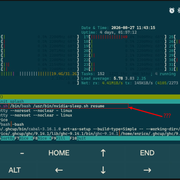
This seems to match this report on NVidia forum and this message from our forum, and I wonder if it could be related to the original issue I've reported here.
Last edited by Enrico1989 (2026-08-27 10:14:00)
Offline
#17 2026-08-27 15:56:05
- seth
- Member
- From: Won't reply 2 private help req
- Registered: 2012-09-03
- Posts: 78,659
Re: Hardware boots, but the system doesn't
The journal would probably be more interesting than htop - maybe there're some error messages explaining this.
You could try to deactivate the VRAM preservation, but w/ the original symptom I suspect this to be rather another symptom of the same problem - the GPU.
Offline
#18 2026-08-27 19:20:13
- Enrico1989
- Member
- Registered: 2018-07-05
- Posts: 429
Re: Hardware boots, but the system doesn't
At https://paste.c-net.org/GeoffNeeding is the output of
sudo journalctl -b -2 --since todayOffline
#19 2026-08-28 07:55:41
- seth
- Member
- From: Won't reply 2 private help req
- Registered: 2012-09-03
- Posts: 78,659
Re: Hardware boots, but the system doesn't
Aug 27 11:38:48 greywarden kernel: task:transmission-da state:D stack:0     pid:881906 tgid:881905 ppid:1      task_flags:0x400040 flags:0x00080002
Aug 27 11:39:08 greywarden kernel: task:transmission-da state:D stack:0     pid:881906 tgid:881905 ppid:1      task_flags:0x400040 flags:0x00080002
Aug 27 11:41:59 greywarden kernel: task:kworker/27:1    state:D stack:0     pid:2256879 tgid:2256879 ppid:2      task_flags:0x4208060 flags:0x00080000
Aug 27 11:41:59 greywarden kernel: task:nvidia-sleep.sh state:R  running task     stack:0     pid:3151976 tgid:3151976 ppid:1      task_flags:0x400100 flags:0x00080803
transmission-daemon is stuck on IO, nvidia is running and (likely) holding a mutex
Aug 27 11:41:59 greywarden kernel: INFO: task kworker/27:1:2256879 is blocked on a mutex likely owned by task nvidia-sleep.sh:3151976.Apparently when switching the mode w/ the VT change (you're using the 580xx drivers?)
=> can you actually switch the VT (ctrl+alt+f3) w/o attempting to sleep?
In any event, try the behavior w/o interference from transmission.
Offline
#20 2026-08-28 18:54:07
- Enrico1989
- Member
- Registered: 2018-07-05
- Posts: 429
Re: Hardware boots, but the system doesn't
transmission-daemon is stuck on IO
Ooops, I might have had this running in a terminal:
while true; do transmission-remote -l; sleep 1; clear; donenvidia is running and (likely) holding a mutex
Not sure what this could be due to… unless you're saying transmission being stuck is causing it???
(you're using the 580xx drivers?)
Yep, I think so, a couple of packages from the AUR for 32 and 64 bits (can't check now, will update asap).
can you actually switch the VT (ctrl+alt+f3) w/o attempting to sleep?
What do you mean? Sure I can, and sometimes I do.
In any event, try the behavior w/o interference from transmission.
I'll avoid that `while` above.
Offline
#21 2026-08-28 19:13:05
- seth
- Member
- From: Won't reply 2 private help req
- Registered: 2012-09-03
- Posts: 78,659
Re: Hardware boots, but the system doesn't
What do you mean? Sure I can, and sometimes I do.
That. Whether the modeswitch generally (outside the context of the S3) works.
I'll avoid that `while` above.
I meant more like stopping/killing the daemon, in doubt using a https://wiki.archlinux.org/title/Power_ … stem-sleep
Offline
#22 2026-08-28 22:32:35
- Enrico1989
- Member
- Registered: 2018-07-05
- Posts: 429
Re: Hardware boots, but the system doesn't
What's the correct way of shutting transmission-daemon down? I don't see it from the man page. I've searched online, but I'm not sure. Surely I can use kill, but...
Offline
#23 2026-08-28 22:35:28
- seth
- Member
- From: Won't reply 2 private help req
- Registered: 2012-09-03
- Posts: 78,659
Re: Hardware boots, but the system doesn't
https://man.archlinux.org/man/transmiss … .1.en#exit
Alternatively if you're starting it as systemd service, you'd stop it that way (what most likely will end up killing it)
Offline
#24 2026-08-29 06:47:53
- Enrico1989
- Member
- Registered: 2018-07-05
- Posts: 429
Re: Hardware boots, but the system doesn't
Oh, silly me, I was looking only at man transmission-daemon!
Anyway, I've made the following file executable (initially witout a while, which I put when it didn't work the first time, thinking that maybe I needed to wait for internet to come back):
#!/bin/sh
case $1/$2 in
  pre/*)
    echo "Going to $2..."
    transmission-remote --exit
    ;;
  post/*)
    echo "Waking up from $2..."
    while ! transmission-daemon; do
      sleep 1
    done
    ;;
esac
But it doesn't seem to work, in the sense that after waking up,
$ transmission-remote -l
Unable to send request to 'http://localhost:9091/transmission/rpc/': Could not connect to server
I have add that I'm putting system to sleep without the daemon running, because I want to be sure it is run by the script above, as opposed not being stopped at all. After all, even if "transmission-remote --exit" fails, that should be unrelated to when the "while" loop above runs, no?
Here's the journal right after latest attempt to suspend and wake up:
Aug 29 08:31:49 greywarden systemd-sleep[562471]: Going to suspend...
Aug 29 08:31:49 greywarden systemd-sleep[562472]: Unable to send request to 'http://localhost:9091/transmission/rpc/': Could not connect to server
Aug 29 08:31:49 greywarden (system-sleep)[562468]: '/usr/lib/systemd/system-sleep/transmission.sh' failed with exit status 1.
Aug 29 08:31:49 greywarden systemd-sleep[562467]: Performing sleep operation 'suspend'...
Aug 29 08:32:49 greywarden systemd-sleep[562467]: System returned from sleep operation 'suspend'.
Aug 29 08:32:49 greywarden systemd-sleep[562642]: Waking up from suspend...
Aug 29 08:32:50 greywarden transmission-daemon[562651]: ip-cache.cc:306 Couldn't obtain source address in any IP protocol, no network connections possible (ip-cache.cc:306)
Aug 29 08:32:50 greywarden transmission-daemon[562651]: session.cc:421 Listening to incoming peer connections on 0.0.0.0:51413 (session.cc:421)
Aug 29 08:32:50 greywarden transmission-daemon[562651]: session.cc:421 Listening to incoming peer connections on [::]:51413 (session.cc:421)
Aug 29 08:32:50 greywarden transmission-daemon[562651]: port-forwarding.cc:217 State changed from 'Not forwarded' to 'Starting' (port-forwarding.cc:217)
Aug 29 08:32:50 greywarden transmission-daemon[562651]: tr-udp.cc:207 Bound UDP IPv4 address 0.0.0.0:51413 (tr-udp.cc:207)
Aug 29 08:32:50 greywarden transmission-daemon[562651]: tr-udp.cc:254 Bound UDP IPv6 address [::]:51413 (tr-udp.cc:254)
Aug 29 08:32:50 greywarden transmission-daemon[562651]: tr-lpd.cc:269 Couldn't initialize IPv4 LPD: No such device (19) (tr-lpd.cc:269)
Aug 29 08:32:50 greywarden transmission-daemon[562651]: tr-lpd.cc:283 Couldn't initialize IPv6 LPD: No such device (19) (tr-lpd.cc:283)
Aug 29 08:32:50 greywarden transmission-daemon[562651]: tr-dht.cc:577 Couldn't look up 'dht.transmissionbt.com:6881': Temporary failure in name resolution (-3) (tr-dht.cc:577)
Aug 29 08:32:50 greywarden transmission-daemon[562651]: rpc-server.cc:878 Added '127.0.0.1' to host whitelist (rpc-server.cc:878)
Aug 29 08:32:50 greywarden transmission-daemon[562651]: rpc-server.cc:878 Added '::1' to host whitelist (rpc-server.cc:878)
Aug 29 08:32:50 greywarden transmission-daemon[562651]: rpc-server.cc:1013 Serving RPC and Web requests on 0.0.0.0:9091/transmission/ (rpc-server.cc:1013)
Aug 29 08:32:50 greywarden transmission-daemon[562651]: rpc-server.cc:822 Listening for RPC and Web requests on '0.0.0.0:9091' (rpc-server.cc:822)
Aug 29 08:32:50 greywarden transmission-daemon[562651]: rpc-server.cc:1018 Whitelist enabled (rpc-server.cc:1018)
Aug 29 08:32:50 greywarden transmission-daemon[562651]: rpc-server.cc:1037 Serving RPC and Web requests from '/usr/share/transmission/public_html' (rpc-server.cc:1037)
Aug 29 08:32:50 greywarden transmission-daemon[562651]: daemon.cc:865 Loading settings from '/root/.config/transmission-daemon' (daemon.cc:865)
Aug 29 08:32:50 greywarden transmission-daemon[562651]: utils.cc:140 Couldn't read '/root/.config/transmission-daemon/queue.json': No such file or directory (2) (utils.cc:140)
Aug 29 08:32:53 greywarden transmission-daemon[562651]: session.cc:1503 Transmission version 4.1.3 (838877323f) shutting down (session.cc:1503)
Aug 29 08:32:53 greywarden transmission-daemon[562651]: rpc-server.cc:852 Stopped listening for RPC and Web requests on '0.0.0.0:9091' (rpc-server.cc:852)
Aug 29 08:32:53 greywarden transmission-daemon[562651]: Closing session
Aug 29 08:32:53 greywarden systemd[1]: systemd-suspend.service: Deactivated successfully.
Aug 29 08:32:53 greywarden systemd[1]: Finished System Suspend.
Aug 29 08:32:53 greywarden systemd[1]: systemd-suspend.service: Consumed 3.636s CPU time over 11.583s wall clock time, 6.1M memory peak.
Offline
#25 2026-08-29 07:12:12
- seth
- Member
- From: Won't reply 2 private help req
- Registered: 2012-09-03
- Posts: 78,659
Re: Hardware boots, but the system doesn't
Aug 29 08:32:50 greywarden transmission-daemon[562651]: utils.cc:140 Couldn't read '/root/.config/transmission-daemon/queue.json': No such file or directory (2) (utils.cc:140)The hooks are run as root, you'll problably have to "sudo -u enrico …"
Offline